
The Post Navigation Element will provide to display pagination to your website and have users navigate through your pages with ease. The Post Navigation is a Theme Element and is available under the Single Post Template that generates content dynamically.
Content Tab
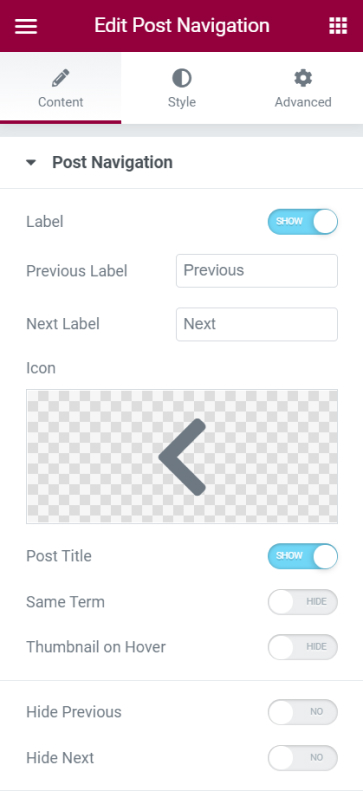
Post Navigation
- Label - Choose to either show or hide the previous and next labels
- Previous Label - Name here the previous label to your liking
- Next Label - Name here the next label to your liking
- Icon - Set the icon for the labels
- Post Title - Choose to either show or hide the post title under the previous and next labels
- Same Term - This option will have the previous and next posts in the same term as the current post.
- Thumbnail Hover - Select to show the post's thumbnail when users hover over the labels
- Hide Previous - Hide the Previous label
- Hide Next - Hide the Next label
Style Tab
Label
- Spacing - Set the spacing between labels and the posts
- Color - Set the color for the labels
- Typography - Tweak the typography options for the label's text
Title
- Color - Set the color for the title
- Typography - Tweak the typography options for the title
Arrow
- Color - Set the color for the arrows
- Size - Control the size of the arrows
- Gap - Set the gap between the labels and the arrows
Position
- Align - Align the navigation either Left, Center, Right, or Strech
- Space Between - Set the space between the labels
- Gap - Set the gap between navigation and the content
Set the settings for the Advanced Tab that is appropriate for the element.
