Gain flexibility and control over all your sections and columns when working with Neuron Themes. You can position elements inside columns and sections with the options available to achieve a professional-looking design. This feature will allow elements within columns that are of different heights to align with one another.
- First, start off by selecting the section or the column you want to align and open the Options Tab.
- Select the Layout Tab
- Vertical Alignment - choose from the dropdown menu either
Top
Middle
Bottom
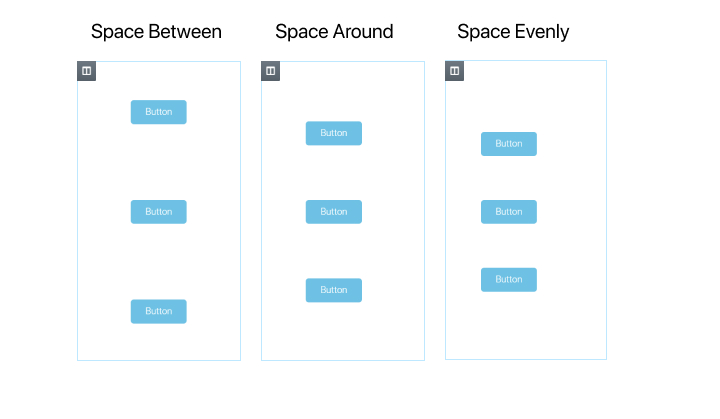
Space Between - This option will set the elements to start and end at the edge of the column with equal space between them.
Space Around - This option will have the elements will be spaced equally and the edges, top, and bottom will share half the size of the space between the elements.
Space Evenly - This option sets the elements to have equal space between them and at the top and bottom edges. - Horizontal Alignment - choose from the dropdown menu either
Start
Center
End
Space Between - This option will set the elements to start and end at the edge of the column with equal space between them.
Space Around -This option will have the elements will be spaced equally and the edges, top, and bottom will share half the size of the space between the elements.
Space Evenly - This option sets the elements to have equal space between them and at the top and bottom edges.