
You can manage and keep records of your stock via the backend and present to show if products are available or if they are out of stock. You can then display the stock via the Product Stock Element that extracts content from the database and presents it dynamically on the page, which you can style and design it.
- To gain access to the product stock from the WordPress Dashboard > Products > Add New. Or you can add stock for existing products from Products > All Products, and click on the Edit button that appears once you hover over a certain product.
- Locate the Product Data tab
- Click on the Inventory option from where you can tick the Enable stock management at production level.
- This will allow you to add the Stock Quantity, in that way all your products will be automatically managed and the stick will be updates into three main categories of In Stock, Out of Stock, or On Backorder.
- You can also choose if you want to Allow Backorders
- On Lock Stock Threshold you can set at which amount of product you should be notified that the stock is running out
- If you tick the Sold Individually option you will limit the product to single order only.
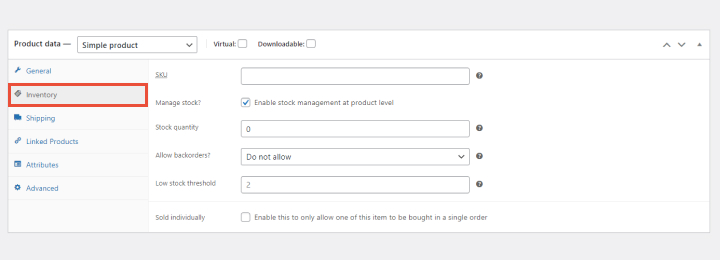
If you leave the Enable stock management at production level option OFF, you will be responsible for updating the Stock Status of the product.
